





On Wednesday, I watched Zoom’s 45-minute “Get The Latest Product News From Zoom” webinar. When I received the lead, I figured it would be related to Zoom 5.0, the latest upgrade to Zoom and the result of its 90-day security-enhancement plan.
Quick plug: Earlier on, this same day, rAVe held a one-on-one session with Zoom’s global CIO, Harry Moseley, as part of LAVNCH WEEK. The discussion answered a lot of the questions on many of our minds about UCC integration in regard to platforms like Zoom.
From the webinar description, I had an idea of what to expect: “We’re excited to announce that Zoom 5.0 is now available! This release delivers one of our most advanced security enhancements to date. Join Zoom experts in this live webinar to walk through the latest release and participate in a Q&A session.”
For me, the golden nuggets there were:
- “Join Zoom experts in this live webinar to walk through the latest release.” I wanted to see who from Zoom would be leading the webinar. After logging on, I saw two friendly faces — Raul Montes, content marketing manager at Zoom, and Kristen Klein, manager, customer marketing at Zoom. Both are ex-Cisco employees, by the way.
- “Participate in a Q&A session.” If the media coverage as of late were any indication, I knew the audience could pose some tough questions to Zoom about security. I wanted to see how that all went down. Surprisingly, we didn’t see any super-tough ones (which means those questions weren’t brought up by Klein, the moderator, or those questions weren’t being asked in this particular format).
I also wanted to see whether the webinar would cover anything new, in addition to just rehashing the details of what we already learned about Zoom 5.0. I wanted to see if the UCC platform made good on the promise it laid out (or, at least, on the webinar agenda it laid out).
Did it? Keep reading.
Recap of Zoom’s Network Updates
In the webinar (presented via the webinar side, not the meeting side, of Zoom — so all video and live chat and audio were turned off), we got a recap on Zoom’s network updates from Klein and Montes. I added the screen shots from the presentation, so you can see the updates firsthand:
- Support for AES 256-bit GCM encryption: Zoom is upgrading to the AES 256-bit GCM encryption standard, which offers increased protection of your meeting data in transit and resistance against tampering. This provides confidentiality and integrity assurances on a Zoom Meeting, Zoom Video Webinar, and Zoom Phone data.


- The ability to ‘Report a User’ to Zoom: You can do this “via the new Security Icon in the lower toolbar,” Zoom shares. These reports go directly to the Zoom Trust & Safety Team, who reviews the conduct reported and investigates the appropriate actions or next steps to take.
- Enhanced data center information: Zoom’s intro slide said, “Scheduling level for meetings and webinars, and view details in meeting.” I take this to mean something along the lines of what Gary Kayye reported, “The account admin may choose which data center regions their account-hosted meetings and webinars use for real-time traffic at the account, group, or user level.”


- Enhancements to end/leave meetings: Per Zoom, this is an “improved exit flow” including the ability to assign a new host if you need to drop off the meeting. Check out the screen shot of what that looks like below.


- Picture-perfect control: In Zoom 5.0, you can now “disable the ability for participants to show their profile picture and prevent them from changing it in a meeting.”
- Minimum password length: The minimum password length is now six characters.
- Cloud recording security: You can now set expiration dates, and you also have the ability to disable sharing in Zoom 5.0.
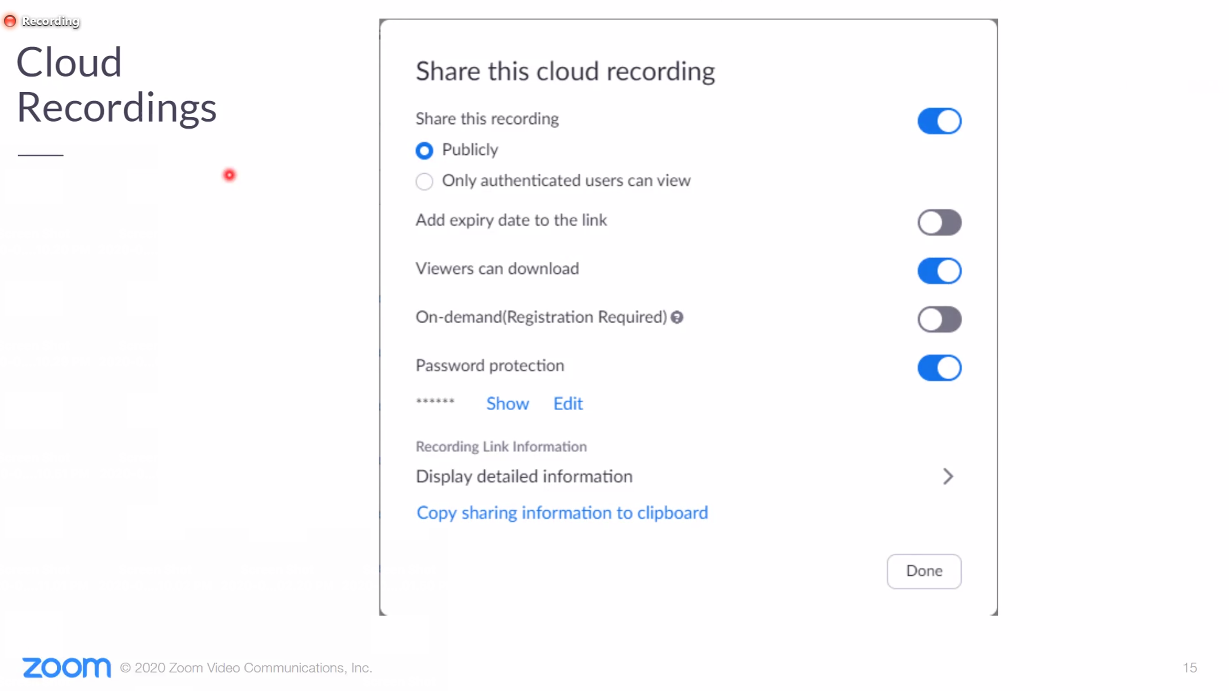

There are a number of other updates on Zoom’s user experience and controls (like Waiting Rooms, secure account contact sharing and more), which you can read about here.
Next, it was time for the audience Q&A. As this was through the Zoom webinar platform, Klein moderated the Q&A and chose which questions she wanted to answer as they came through on her end. But Klein did give ample time for this (25 minutes or so) as she sifted through the questions.
Audience Q&A
I think it’s great that Zoom opened up the webinar to a Q&A, and I was curious to see what types of questions people would ask. Here were a few that came up:
Do all users have to have Zoom 5.0 for these features to apply?
System-wide account enablement will take place on May 30. As the host, you want to get the new version right away, Klein urged. By May 30, everyone’s gonna need to upgrade to Zoom 5.0 or else it’ll be a forced upgrade (i.e., automatically pushed to your machine) on June 1.
Can you turn off the ‘Report a User’ feature?
Klein didn’t seem to think so right now, but she said it was great feedback and she would take it back to her team.
Do we have to delete the old version of Zoom from our laptops to get the new one?
Nope. Just download the Zoom installer and it’ll run the new version download.
How do we update our Zoom Rooms remotely?
Klein directed us to the Zoom admin page (see below) for help here.
Is Zoom 5.0 connected to 5G?
No connection there.
Are there any training docs available on the new upgrades?
Zoom is in the process of putting up new YouTube videos around Zoom 5.0. In the meantime, there’s plenty of info on the Zoom 5.0–dedicated website available (see below).
While I captured some of the Q&A, please don’t quote me on anything above — check out Zoom’s resources below and the webinar recording here if you have questions.
Webinar Verdict
I think Zoom ultimately made good on what it hoped to communicate today via its webinar agenda. Here are the resources Klein mentioned. Hopefully these answer “any and all questions” about the security upgrades:
- Dedicated website for Zoom 5.0
- Zoom support site
- Zoom blog
- Zoom’s weekly “Ask Eric Anything” webinars
- The recording from this webinar
In addition to getting a better firsthand understanding of the upgrades to Zoom 5.0 myself, I was pleased to see the webinar presenters answer questions from the audience with clarity and candor. That’s something about Zoom that I find particularly impressive — its humility and willingness to admit missteps, then commit to change right away. This is admirable and smart.